Showing posts with label work. Show all posts

Friday, August 22, 2014

Evernote Power User Volume 5 - Note Template (Windows App)

I use Evernote to drive my entire day.  When I am at work, I am feeding Evernote information constantly and referencing old notes to stay productive.  I find that I add the same type of information consistently, so I found using templates as a fast way to create notes.  Doing it this way allows for clean and consistent notes. To do this, follow the steps below:

1. Create a note that has elements that you need in your daily notes such as sections, grids, and tasks.


2. Export the note to a .enex file to the desktop. 


3. With the Evernote app pined to the task bar, drag the .enex file to the pinned shortcut.  This will allow you to the right-click on the Evernote app and create a note with the pinned template. 


Wednesday, April 2, 2014

Evernote Power User - Volume 3 - Read Later

With all the information that we are  thrown everyday,  we need a way to keep the information stored for easy access when you need to read it later.  A well known solution for this is an application called Read it Later , which allows you to send links to the application and read it later when your time allows.  As a Evernote Power User , I try to find ways to move task like this into the Evernote world so that I may reduce the amount of applications I am accessing daily. 

The "_Read Later" Notebook 

What I do is create a note book called "_Read Later" and all links that I can't get to at the moment into that Notebook.  Placing the underscore (_) before the notebook name, places the notebook in the top of your notebook list.    


The Process 

All during the day add items into your "_Read Later" Notebook.  Make sure to tag the note based on it's relevance.  This could be articles you find on the web, mail that you have taken a picture of with your smartphone, or videos that you want to watch from youtube. Block out a time during the day to go over all of the items in the notebook. Once you have read the item, place it in it's own notebook and clean out the _Read Later folder for the next day.  

Doing this will help reduce information overload. 

Tuesday, March 19, 2013

Revisiting DOIT.IM .. Getting Things Done has a Champion!

I made a post some time ago on the task management software DOIT.IM. The software is great and has made changes recently that makes it essential to my daily workflow. This program is the first app I open while brushing my teeth and second to only my alarm app when I am going to bed.

Some of the features that make this a must to anyone that wants to get things done are:

Sub-tasks, which are essential for doing projects.


Many task management software packages are horrible at this (i'm talking to you Astrid!).  DoIt.IM does it the right way by actually allowing you to create a project.  Within those projects you can have all the tasks that pertain to that project.


Goals, "Where there is no vision, the people perish " Prov 29:18

This is the heart of the program for me, and where I start my day.  Above projects is the Goal section , within these goals can be many projects.  This allows you to get an overall view of the things that are important to you.  Approaching tasks this way ensures that you never feel unaccomplished at the end of the day.


Review, check how productive you were ..or were not...

There is a benefit in giving yourself a grade.  DoIt.IM has a beta feature where you can grade you performance on a daily and weekly basis. This feature gives you a way to make sure you are improving as the days go buy.


This program is what thehustlerstech.com is all about. The android counterpart works exactly the same; and at $20 a year the increase in productivity you will enjoy is well worth the price. 

Resources: 

Monday, June 25, 2012

Hustle Tip:Using a Navigation Shortcut

If you have an Android device , you also have the most advanced navigation technology on the market. There are a number of reasons why there will be NO navigation system that will beat the one that is in your pocket a few are:

  1. The sync between the Internet and GPS allows for a number of online service to be available.
  2. Google Maps includes street view that will allow you to see destinations up close.
  3. The integration with Google services like Latitude makes it easy to find friends.
  4. Google continues to make it better with over-the-air updates.
So since you have this great technology, a great way to utilize it is by using navigation shortcuts.  From your device's main screen, hold and select "shortcut".  You will then select "Directions and Navigation".  

Once you have your directions shortcut box up you can place any address in with a relevant name and icon. 

Situations that a navigation shortcut comes in handy for the hustler:
1.If there are a number of stops that you need to make in a day.  Prior to the going out on your mission plot out all of the stops and make a shortcut for each.   Place each stop from the first to the last in top to bottom order so you can get to each destination in a timely fashion.
2. Quickly gaining traffic reports for places you go frequently.  It is a benefit to know how fast you will be able to get back to your office from where ever you are.  This will allow you more clarity to on how far you can stretch your most valuable resource .. time.


Tuesday, November 8, 2011

Voice Dictation Through Your Android Device

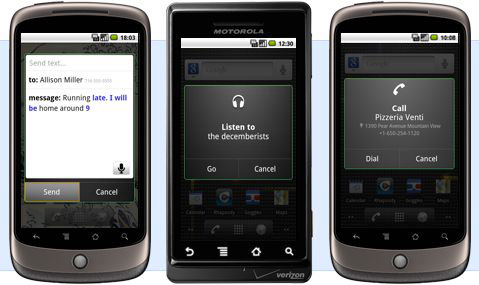
The use of voice dictation on the Android devices has not gotten it's props,  due to the popularity of Seri (the dictation service on the iPhone) .  Android has really made huge strides with their voice recognition software and there are some things that you can do with it to make you more productive:

  • Use it to update word documents on the go.  This is a great way to start a report without typing.
  • Call local businesses by just saying "Call" and the business name.  It uses Google maps to find the business and calls them.
  • Say "note to self" and say a message.  It will send an email to your Gmail address with the audio.  This makes a great instant reminder. 


References:

Monday, October 24, 2011

Education Moving Forward with Khan Academy

It is very easy to get too busy to make sure that the kids are studying. When you are consentrating on so many things, the kids get lost in the shuffle. Khan Academy is a great website that allows you to create a lesson plan that can be tracked.


I have found it very useful . My only problems are two things:  One you have to have a Google or Facebook account to join.  This was not a problem for my older kids but an issue for the seven year-olds.  My other issue is that the information tracking does not show up in the mobile application.  These small issues are small and I am sure they will be addressed with later updates to the site.  

I highly recommend that this site as it will give you a way to have study time over and above their school work.  

Check out this video where the one and only Bill Gates co-signs this site:


Resources:

Wednesday, October 19, 2011

Dropbox , Never Lose a Document Again


If you use a computer you will get into a situation that you will need Dropbox. There is nothing more stressful than having a presentation that you worked on all night, to wake up and your computer wont boot up!  Or what about the scenario when the print out of your term paper has gotten damaged by rain, and you are miles away from where your files are on your computer?  The less effective way had been to email things to yourself, which would make that document available for you anywhere.  The more clean and effective way to get this done is to use Dropbox.

Dropbox has gotten me out of way too many sticky situations for me to list.  The way that it works is it creates a folder on your computer that is synced with your Dropbox Internet account.  What ever you place in the folder is then accessible not only on your Internet Dropbox web account, but on any computer that you are using the Dropbox folder in.  To make this clearer:  Say you have a term paper that you save on your computer as termpaper.doc in your Dropbox folder on your computer.  That same document will be saved on your dropbox.com web site and on your second computer that also has the Dropbox program on it.  Also any changes made to the termpaper.doc will reflect on the web and the other computer instantly.

This is one of those must have apps for any busy person!

Resources:

Dropbox Website   
Dropbox Android App 

Thursday, October 13, 2011

Producteev + Astrid The "Getting Things Done" Marriage

This is the first post that I will be making on this blog and I wanted it to represent what this blog is about. The goal that I had when thinking of creating a blog was to empower the "Go-Getters".  I want to make sure that the tech that people use everyday, are used to their fullest potential. I also want to inform people of new technology that will help them run their business, go through school , or navigate their careers.

The program (or programs) that fit this bill, are Producteev and Astrid.  These are two programs but they work together as a great task/to-do management system. I have spent hours researching a task management system and this one by far brings the most features and the cleanest interface.


Producteev is a web based program at www.producteev.com, it uses a very colorful interface and is very flexible.  The best way to use this is by using the GTD methodology by David Allen.  If you are not familiar with the GTD methodology, and to get a walk through on how to use it with Producteev, check out this article here for more details.


Astrid is an Android app that has been out since the early days of Android.  This means that it has been developed to be very stable and feature rich.  The interface can be modified to light , dark or transparent so you have enough options there to make it visually pleasing.

The power of these systems are from the pairing of the two programs.  The key to making this work for you is to get very familiar with the Producteev program, spend time setting it up, and sync the tasks with Astrid.  This is a seamless process and makes your Android device your reminder for all of your tasks.  When used properly, it can really make a difference in your productivity.   I have used these programs for school and my business for the last four months and I have found that I am getting more done and wasting less time.

These are free programs so there is no excuse for not getting that long list of objectives done and putting more money in your pocket as a result!

Resources:

Producteev Website
Astrid Program
GTD Methodology with Producteev
Getting Things Done by David Allen (Book)